

Cornerstone content helps users and search engines understand your area of expertise.
Once search engines view you as an authority for a particular topic, you’ll find it easier to rank for keywords related to that topic.
This makes cornerstone content essential for every SEO strategy.
In this post, we’ll discuss how to create cornerstone content and various examples of excellent cornerstone content.
Want us to
scale your traffic?
For the first time, The Copyblogger methodology is now available to a select few clients. We know it works. We’ve been doing it since 2006.
What Is Cornerstone Content?
Cornerstone content, sometimes referred to as pillar content, is a long-form blog post that provides a general overview of a broad topic.
Cornerstone content pieces often have “ultimate guide” or “beginners’ guide” in the title as they are designed to provide a complete snapshot of a topic. Most cornerstone content is well over 2,000 words long, though some can be over 5,000 words long.
An example of a cornerstone piece of content is our content marketing guide.
The content marketing guide provides a general overview of what content marketing is, though rather than going into too much detail on any one subtopic, it links out to other blog posts on each subtopic. For example, it links out to specific blog posts on content marketing examples, content marketing strategy, generating content ideas, and creating a content marketing calendar.
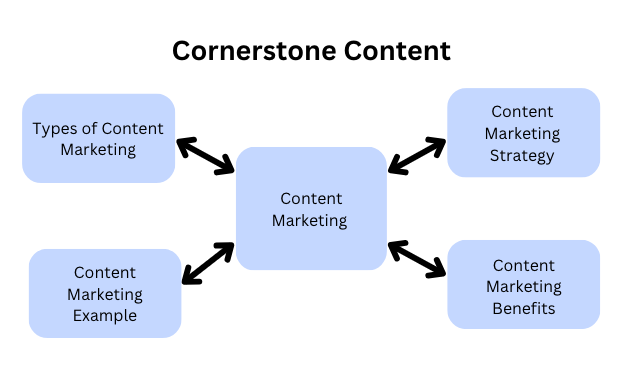
This internal linking structure is a key characteristic of cornerstone content, which makes it such a critical aspect of a high quality SEO strategy.
What Is The Benefit Of Cornerstone Content?
Cornerstone content is helpful for SEO.
Search engines want to show their users content from experts, and one method they use to determine your website’s authority and expertise on a topic is analyzing how thoroughly a website covers that particular topic.
To illustrate this, consider the following scenario.
Website A has over 100 high quality (quality is still critical) articles on cat health, whereas Website B only has two articles on cat health among hundreds of other articles related to travel tips.
In this case, Website A will likely be seen as the more authoritative source on cat health.
(Note: topical authority isn’t the only consideration search engines take into account when determining rankings, though it is a significant factor.)
So if you want to dominate the search engines for a particular keyword, create a cornerstone blog post (e.g., “cat health”) and then add internal links to your other blog posts targeting various subtopics mentioned within the cornerstone piece of content (“best cat supplements” “wet food vs. dry food for cats,” “how much to feed a cat,” etc.) can help your website establish itself as an expert on that topic.
As a result, you’ll likely see all your content related to that topic rise in the search results.
Below, we’ll tactically discuss how you can create cornerstone content, from finding the best topic keyword and writing to post to implementing an internal linking strategy and promoting your new cornerstone article for maximum reach.
How To Create Cornerstone Content
Below we’ll discuss the step-by-step process of creating cornerstone content.
Step 1: Identify The Main Topic And Keyword
A cornerstone content strategy typically doesn’t require detailed keyword research because the keyword you’re targeting is just the main topic (often referred to as the “head term”).
An example of a cornerstone keyword might be “cat health.”
A common concern is that head terms are the most competitive keywords, and few websites have the authority necessary to show up for them in the SERPs.
For example, “cat health” has a difficulty level of 64 (quite high) and is dominated by an authoritative website like petMD.
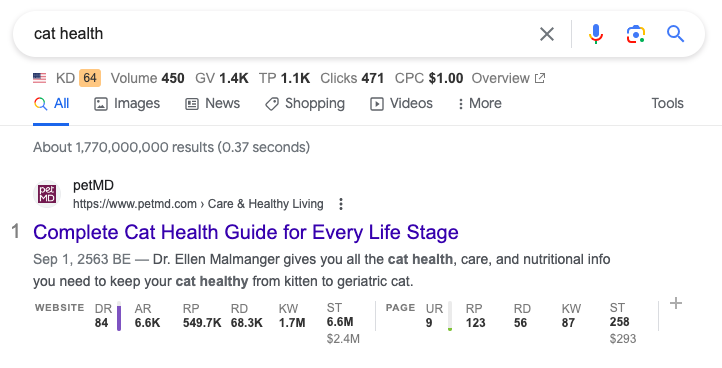
It’s true that you likely won’t rank for that keyword right now if you have a newer website or a website with a fraction of the links.
However, creating a cornerstone piece of content for that keyword is still relevant if cat health is the main topic you plan to discuss on your website. This is because great cornerstone content anchors the rest of your content targeting long-tail keywords.
So even if the cornerstone content doesn’t rank for the head term, you’ll likely see your other content targeting those longer tail keywords rise in the rankings because search engines can see that you’re an authority on that topic.
Without that cornerstone piece of content, it would be much more difficult for search engines to deduce that you’re an expert on cat health.
Nevertheless, most websites only ever need one piece of cornerstone content.
Even here at Copyblogger, while the website generates over 50,000 monthly visits and has a very high domain rating, we only have eight pieces of cornerstone content; content marketing, search engine optimization, copywriting, email marketing, internet marketing, landing pages, conversion rate optimization, and sales pages.
And even eight pieces is probably more cornerstone content than necessary.
So, there probably won’t be a lot of keyword research at this stage. Instead, select the head term that best matches the main topic you want your website to be viewed as an authority on.
Step 2: Map Out Various Additional Subtopics
Once you’ve defined the main topic that you’ll create your content cluster around, map out the various subtopics you’ll discuss within the cornerstone content piece.
Essentially, your cornerstone content should provide a general overview of the topic and address frequently asked questions that people typically have regarding that topic.
You can use ChatGPT to help you build your outline, though be sure to edit it yourself. For example, I asked it to create an outline for my article on “cat health:”
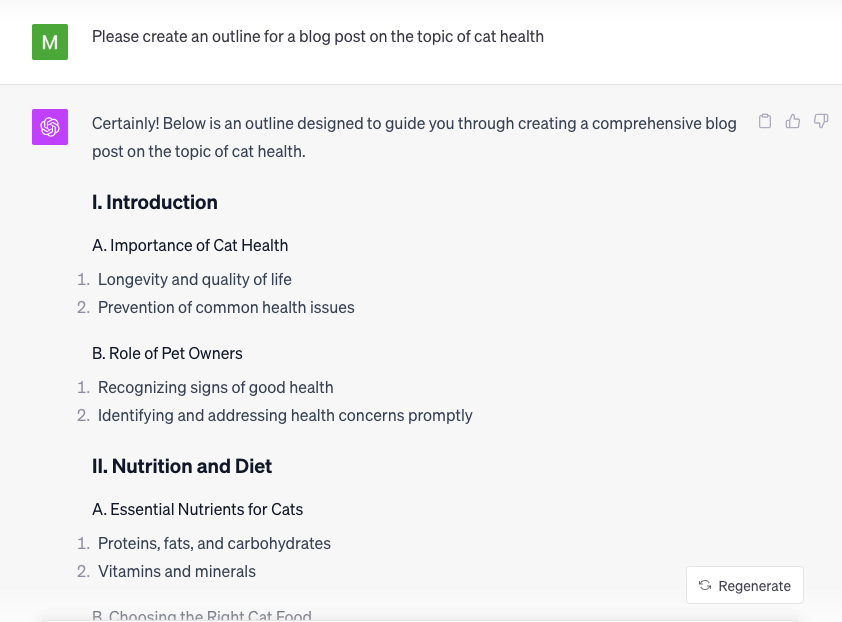
Here’s the full outline it generated:
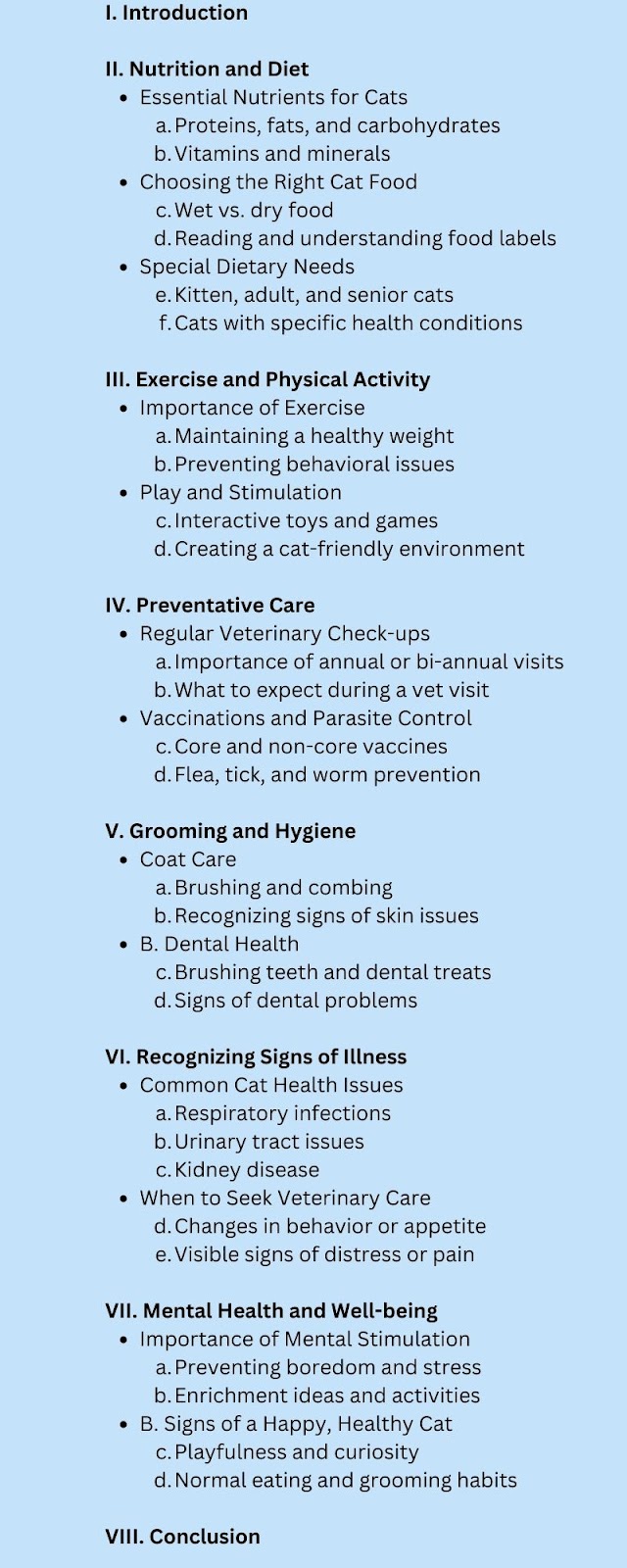
This is pretty good, but you might still want to edit the outline yourself to add any critical subtopics that someone searching the main topic would want to know about or omit any sections that are irrelevant.
Remember that for each subsection (e.g., “grooming and care,” “exercise and physical activity,” etc.), you’ll eventually create individual blog posts that go into more detail for each of those topics.
Step 3: Creating And Optimizing The Content
The next step is to write the content for your cornerstone content. Like any other piece of evergreen content, follow the best practices for creating a high quality blog post, like:
- Including the keyword in the title tag and the first paragraph of the post.
- Providing unique value from all of the other content ranking in the SERPs.
- Using a tool like Surfer or Clearscope to add relevant keywords throughout the blog post.
The only major difference is that you don’t need to go too in-depth on any particular subsection within the content because you’ll be linking out to a blog post that covers the topic in more detail.
Instead, the cornerstone content page is more of a map that people can use to explore various subtopics within the broader topic.
Therefore, adding internal links is critical to creating a successful cornerstone content page.
We touched on internal linking above, but an internal link is essentially a link to another page on your website. In this case, it would be a link to a blog post on a particular subtopic you discuss in your cornerstone content.
For example, the screenshot below is one subsection inside the content marketing guide. You can see that the words “content marketing strategy” are linked to a blog post dedicated specifically to creating a content marketing strategy.

So even though the content marketing guide provides a brief overview of how to create a content marketing strategy, the link sends the reader to a more detailed guide on creating a content marketing strategy with more tactical information and examples.
This helps search engines find your related posts, and it also makes it easy for users to go deeper into your website. Keeping users on your website is a positive engagement signal to search engines, which can help increase your rankings, and it also helps you build a stronger relationship with your readers.
To maximize the benefits of internal linking, be sure to also link back to the main cornerstone content page.
So a great internal linking structure looks like this:
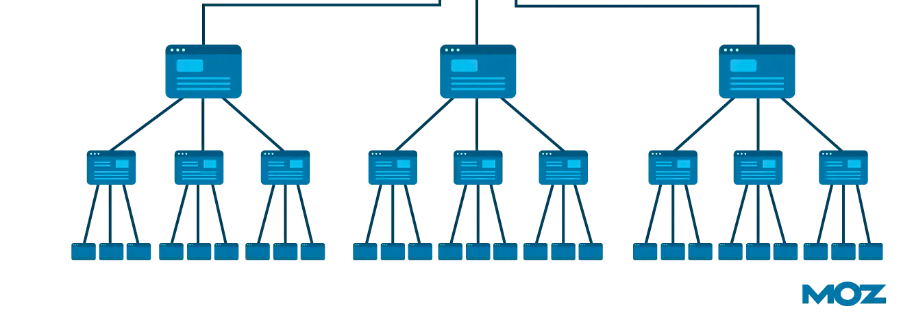
It’s also important to note that most cornerstone content pieces are lengthy – often well over 2,000 words.
Most people won’t read the entire blog post. Instead, they’ll just scroll through the post and pause at the sections that are most relevant to them.
So if your post is difficult to scroll through, they’ll probably just leave it.
To make it easier to scroll and quickly find the sections they’re most interested in, include a table of contents, sticky sidebar, and subheaders.
Here’s a great example of an outstanding user experience from SEMrush:
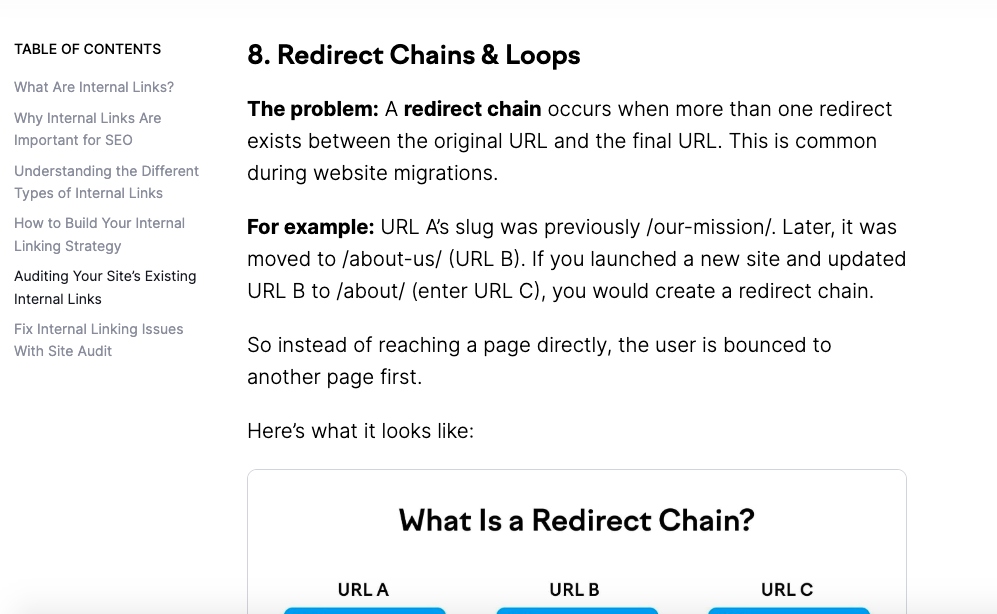
While it may seem counterintuitive, making it easier for people to skim your blog post will actually keep them on your website longer, as most people will simply leave your website if they are immediately overwhelmed by a block of text.
You can also optimize the content for readability by adding screenshots and graphics, using bullet points, and bolding or underlining important concepts.
Backlinko‘s blog also offers an excellent outstanding user experience. You’ll notice that the sentence structure is short and to the point, none of the paragraphs are very long, and there are plenty of bullet points, graphics, and images to easily communicate key points.
Step 4: Promoting Cornerstone Content
After publishing your cornerstone content, there’s a good chance it won’t immediately rank for the desired keyword – especially if you’re in a highly competitive niche.
In fact, it may be years before you rank for the head term.
As mentioned earlier, creating cornerstone content is still useful both for earning topical authority and increasing rankings for long tail keywords.
Yet one powerful strategy to increase the likelihood of ranking for the main head term is earing backlinks from other authoritative websites in your niche to the cornerstone content.
While there are many different methods to earn backlinks (and they are always changing!), the common denominator of all successful link building methods is that they provide value to the other website/company you’re asking for a link from. Some common methods to provide value to other websites include:
- Offering to refresh their content for free in exchange for a link.
- Identifying outdated or broken links to content similar to the new cornerstone content you created.
- Paying for a link.
It’s important to note that these active link building are discouraged by Google, but the reality is that links can significantly improve your rankings. So, use these methods with caution.
Instead, my favorite method is to either create content that attracts links or build legitimate relationships with industry influencers so that they organically link to you.
Here are some methods to attract links to your cornerstone content:
- Include new statistics or data
- Discuss case studies or unique examples
- Include quotes from industry experts
Here are some methods to build genuine relationships that result in links:
- Offer to do a content collaboration (podcast episode, video, etc.)
- Offer to sponsor an event
- Offer to promote their content for free
At the end of the day, building real relationships with people is the most sustainable method to earn links, as those relationships can compound and result in more links down the road and other higher-level collaborations that can help promote your brand.
While it’s easy to get wrapped up in KPIs like brand awareness, organic traffic, and backlinks, it’s important to realize that the end goal is to build the business, and building real relationships tends to contribute the most to both earning links and other larger business goals.
You can also do influencer marketing collaborations and ask industry leaders to promote your cornerstone content through their newsletters and social media channels.
Step 5: Content Updating And Refreshing
Finally, your cornerstone content is never really “done.” As you build out more blog posts targeting subtopics related to your main content, update your main pillar content with short sections on those topics, or at least add internal links (when relevant).
Updating content not only helps your content targeting longer tail keywords rank higher, but it also shows search engines that your content is fresh.
Given that search engines want to show their users up-to-date content, making these minor content refreshes is helpful.
It’s also important to eliminate any information as it becomes outdated and add new information as necessary. For example, this piece of content is actually a refreshed version of an older blog post targeting the same keyword.
Since the original version of this blog post was published, a lot has changed. For example, you can now use ChatGPT to create an outline. So updating it to include these new strategies that are more efficient than previous best practices is important.
Excellent Examples of Cornerstone Content
You already saw that the Copyblogger content marketing guide is an example of a cornerstone piece of content, though here are a few additional examples of cornerstone content.
Example #1: Bankrate: How To Buy A House
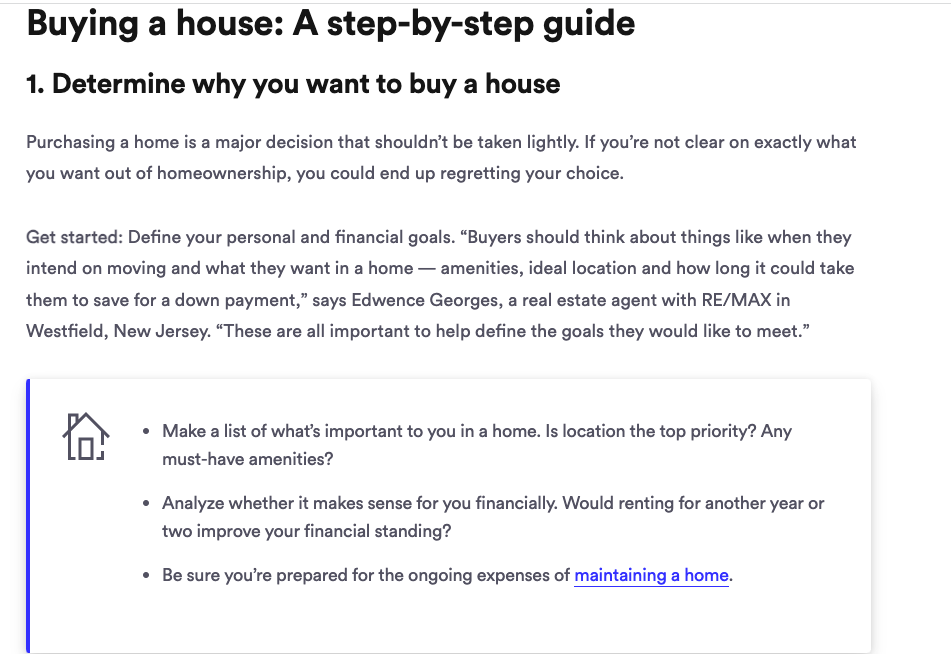
Bankrate specializes in financial education, so it’s no surprise that one of their main cornerstone content pages covers the topic of buying a house.
It has an excellent user experience and includes bullet point lists under each subcategory that make it easy for the reader to quickly scan.
You’ll also notice that it includes internal links to other more detailed blog posts on subtopics, like maintaining a home.
Example #2: Healthline: The Ketogenic Diet
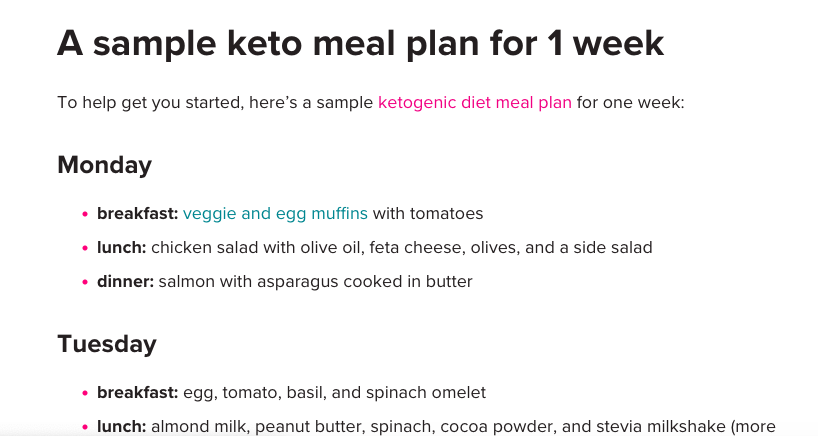
Healthline also has an excellent example of a cornerstone piece of content on the ketogenic diet.
It includes information on what the keto diet is, how it works, a sample diet, benefits, risks, and even healthy keto snacks. For each section, there’s a link out to a more specific blog post on that topic. For example, this blog post links out to a blog post with a more detailed sample keto meal plan:
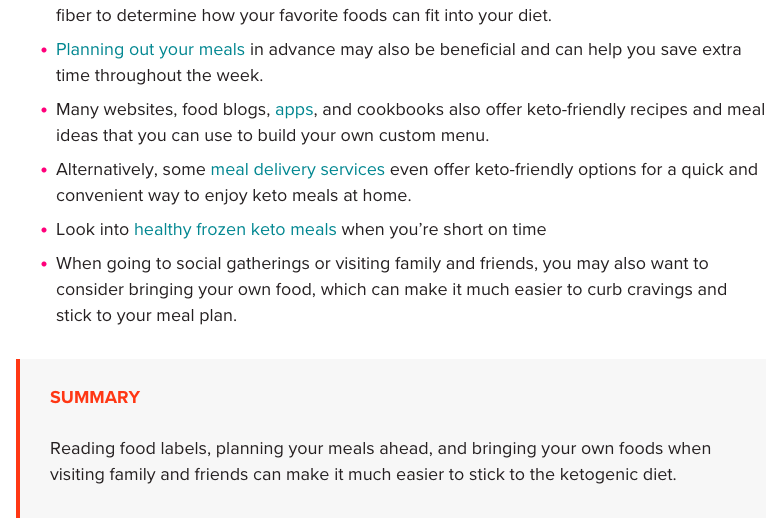
They also offer a summary at the end of each section:
Example #3: Moz: Beginners Guide To SEO
Moz’s Beginner’s Guide to SEO is the poster child of cornerstone content. It is a full guide with individual chapters for each of the SEO topics it discusses.
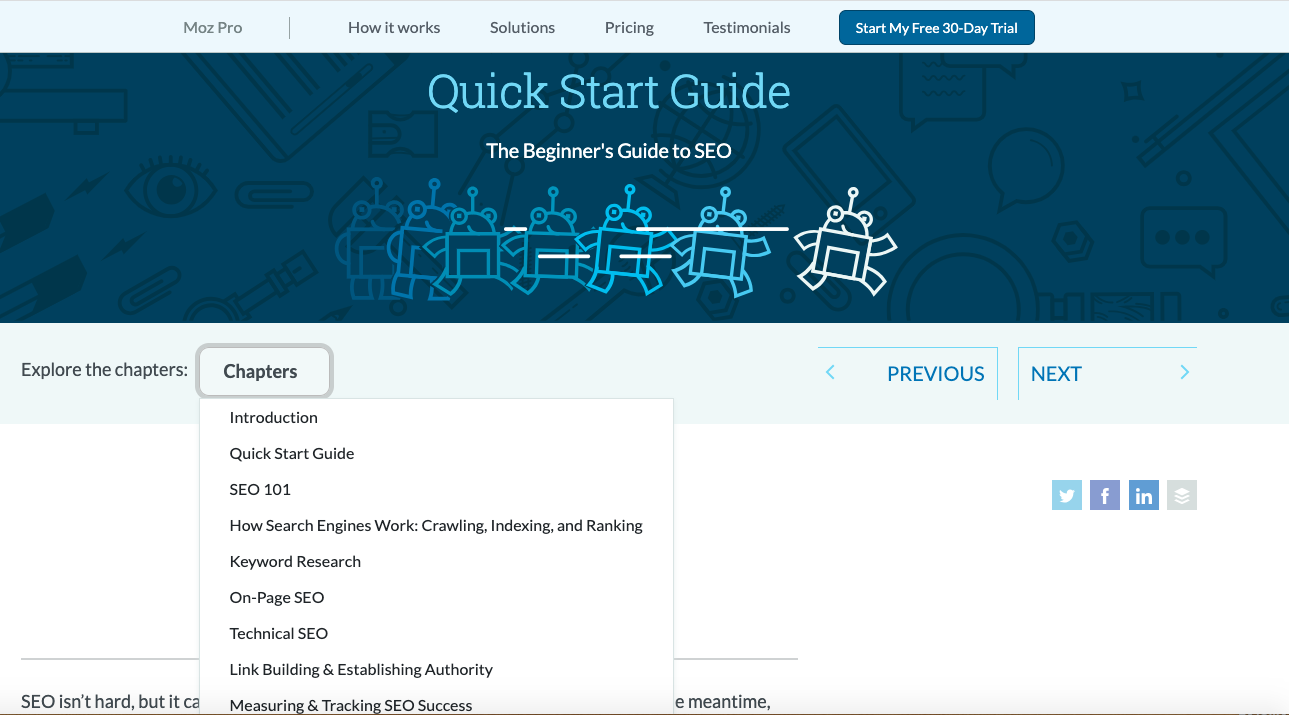
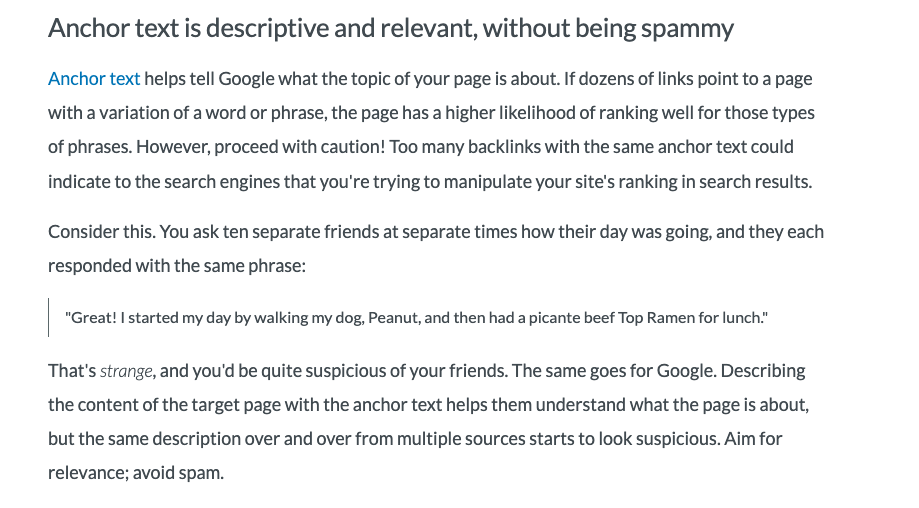
Each chapter also links out to more specific blog posts on relevant topics mentioned.
For example, one of the sections mentions anchor text, so it links out to a blog post about anchor text:
Example #4:HubSpot: Guide To Creating A Sales Process
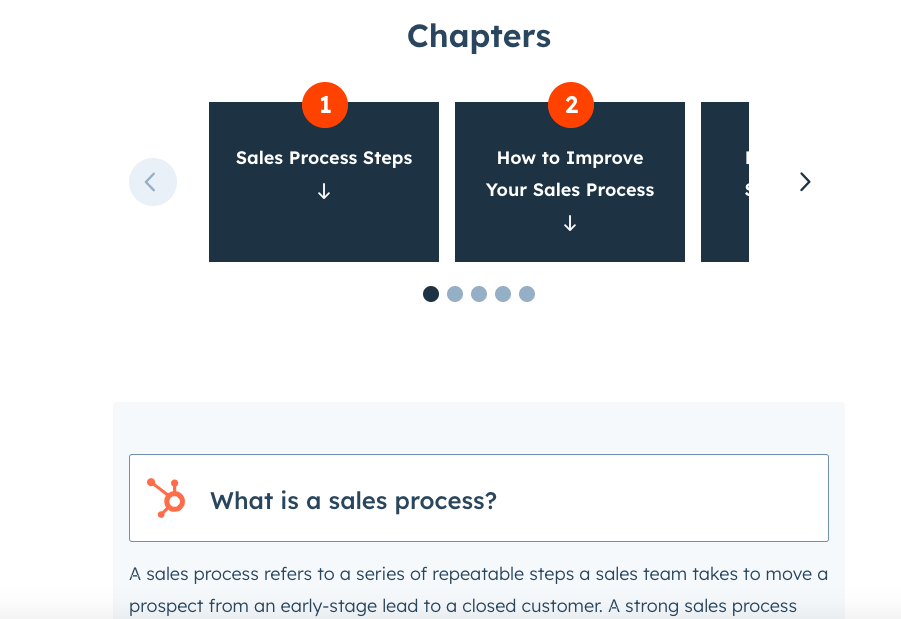
HubSpot has plenty of excellent examples of cornerstone content, and one of them is their guide to creating a sales process.
It delivers an excellent user experience with clear chapters and plenty of design elements that make it easy to skim:
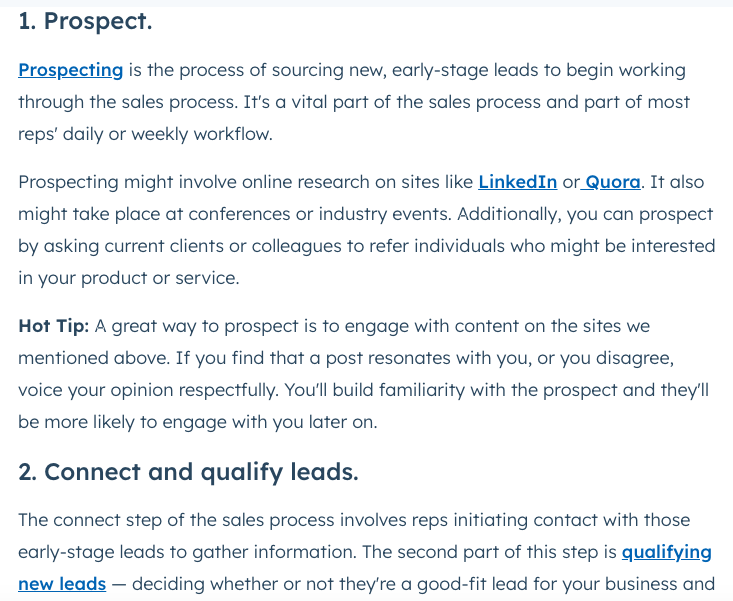
You can also see that they have an excellent internal linking strategy. For example, they link out to blog posts on “prospecting” and “qualifying new leads” within each of those sections:
Take The Next Steps Today
Creating cornerstone content is a great way to organize your content for search engines and establish your website as a topical authority in a specific niche.
Following these steps will help you build your cornerstone content, though if you want more assistance with your broader content marketing strategy, you can join the Copyblogger Academy, where you can ask me and the Copyblogger team specific questions. You’ll also have access to courses on content marketing, SEO, personal branding, and other marketing topics.
Though even more importantly, you’ll have access to a group of peers who are also dedicated to improving their content marketing skills.
Alternatively, if you just want a content strategy done for you, reach out to the Digital Commerce Partners. They’re the team behind the Copyblogger brand and can create and execute a content strategy for you.

Reader Comments (134)
Hey Brian,
What a great post to kick off the year.
Question for you though — in WordPress, can you have dynamic “titles” … I haven’t found a plugin for that yet. Every post on every page has the same one for me.
Cheers
Tony Hung
DeepJiveInterests.com
PS … hey, first comment! Whohooo!
Hey Tony. Not sure what you mean by dynamic titles, but every time you create a post or page in WordPress, you’re creating a title tag with the words in your post title.
The only thing I might suggest is making a php tweak so that the title of the post or page comes before the name of your blog in the title.
Anyone out there have the code to do that handy for Tony?
You know what? You’re absolutely right. Nevermind!
MAN, I have got to get some more sleep these days! 🙂
Cheers
Tony.
I know the feeling. 😉
Great content. I appreciate your thorough posts!
Yes, great post!
Thanks,
JF
This is the first or second post i am reading on this topic. You make things look quite simple. I am feeling like ‘i understood what you are talking about’ Thanks, that’s good feeling! It encourages me to read you more.
Hey Brian – you keep hitting it out of the park again and again. One weekend I’m gonna get myself a bottle of scotch and settle in and read every post you’ve written and jot down notes.
For Tony, here’s the code that makes the title of a post appear first (hopefully it displays right):
This code goes in the header file.
Damn it, it didn’t display. Let me try again…
Doh! I give up. 😉
Tony: send me an email – soho @ tpg.com.au and I’ll send you the code if you want.
That’s smashing stuff.
I will try to follow those two goals to get the desired output.
The post is a very good guide for the young bloggers to improve their content and attract the masses.
Cheers!!!
Tony, you may be interested in the OptimalTitle WordPress plugin, which adds some additional customization with the title tage display.
Sorry, almost forgot the URL:
http://elasticdog.com/2004/09/optimal-title/
Hi Brian
thanks for a great post as usual. A couple of thoughts…
To the question from Tony, have you set up your blog to show titles in full – until recently my blog had the default number of post setting. Also if you have a long title, you can use the post slug to shorten it and make it key word rich.
Secondly I am constantly suprised how much Google loves key words. I’m running a strategy this year of turning some of my blog posts to articles for article submission.
I’m kind of a purist and want to write valuable content but realise that this won’t bring me more clients through natural search.
I experimented last week and one post I took and adapted it for an online article directory.
The post was short but very valuable content and within 48 hours not only did I see the article posted on other peoples blogs (I track my name and my blog name with Google Alerts) but also in my Google Alerts for that key word.
Getting found in Google is key – my biggest challenge at the moment is how to get sign ups to my newsletter and weekly teleseminars – perhaps you could cover strategies for traffic conversion in your next series please!
Thanks
Krishna
Really good tips.I will try to work on them.Thx so much
Hmm… I’m not sure I’m really getting it! I’m a newbie to blogging, but have had successful websites in the past. I’ve got 6 blogs now. Just starting 3 weeks ago. Cornerstone content is a new idea to me and I’m not sure I get it. I’m not sure WHAT the questions are that are being queried on when people come to my site because my google stats are weak at the moment and I get a small clue what people are using to reach me. Mostly it’s referrals from others sites right now. Is “cornerstone content” a large sitemap of sorts that tries to explain in words everything that my site offers and why I made a site to begin with? I’ll re-read this 6 times until I figure it out – but, if someone could explain for a newbie – I’d really appreciate it!
Vern,
Cornerstone content can be a single page, blog post, or article as well as a series of posts or articles. It is supposed to be content that focuses very specifically on a topic that visitors to your site need to know about.
For example, a web designer’s site might have its Cornerstone be a series of tutorials on CSS. A dog breeder might have an article about the importance of a pedigree.
The key is to make the Cornerstone a central focus that can be useful for a long time. Readers have to not only enjoy and find the article useful, they must love it so much that they refer other people to it. Or even better, link to it on their site.
ahhhh. OK I got it. It’s nothing more than creating great articles around a keyword or phrase. The article covers all questions about the keyword others use to reach your site – and anything they could want to know is either answered or referenced and pointing them to another spot on my site. Make it likeable and complete so it is somewhat viral and passed around as an authority on the subject. I think I got it – that explains a LOT. Thanks Aaron for taking the time to answer me!
Vern, you’ve got it, and thanks also to Aaron for stepping in.. I’ve been busy all day. 🙂
That’s what I’m trying to do on my blog now.. any chance you could visit my blog for a while.. pin point what can I improve.. and what i have done right and wrong?
this guy knows what he is talking about, absolutely correct, GOOGLE LOVES CONTENT, i typed in google GOOGLE LOVES CONTENT and this blog appeared number 1 ranking, awesome
Tony & the others: I have really good experience with “All in One Seo Pack” plugin for WordPress. With this plugin you have total control over how does the title look like and you can change keywords in meta tag (I know, they are probably obsolete to this day).
how does the control plug in work???
@Kalmir:
Have you any experiences with the SEO title tag plugin? Which one’s better? All in one or SEO title tag?
Kalmir, the meta keyword tag is pretty much obsolete. However, it’s certainly worth your time to put a relevant and focused meta description on each page as Google displays this in the results.
I’ve been struggling with SEO on one hand and “hypnotic” writing on the other hand, and I’m still trying to tie them in (if that’s possible?) to get the best of both worlds.
Brian,
This is good stuff. I have been reading and reading and coppyblogger has officially become my go to place to remind myself on how to develop the right content and keep the basics in mind.
Thanks!
Content is King.
As usual, this post proves that content is much better marketing then marketing.
~Igor
The hardest thing I do in keeping my blog going is finding new material to write about. i see that I am forgetting about SEO and the reader. This is a great reminder of what I need to do to make it readable and hopefully build a good following of readers.
Fantastic article, I really need to look at the copy on my page and decide if it is doing the job and conveying to the potential customer in right way.
I think maybe I need to go back to the drawing board with writing with conviction and really focusing on the intention of the copy.
Great tips and thanks for writing such interesting blogs.
It’s all about content. I’ve never bothered with any SEO stuff at all. I just wrote and wrote and wrote and readers just started coming.
I know i am so late to read this post.. but after reading this post i feel very proud because at least i know how to optimize my site without help of any seo consultant… So thanks for sharing wonderful post.
Some people underestimate the power of blogging and posting great content. Only recently has it opened my eyes, as I have been finding some killer articles that were drafted over 2 years ago, and they were exactly what I was searching for. Get the content out, be passionate about your niche, and see the magic work.
Thanks!
Ron
Building the foundational content to set the pillar for your blog is crucial. I like to think of these as breakthroughs, that will make people remember your site and who you are rather than somebody to skim over.
Lots of Fantastic information in your blogpost, I favorited your blog post so I can visit again in the future, Thanks.
I love the term “Cornerstone Content.” Simply asking oneself, “What would I like the cornerstones of my site to be?” can provide some valuable insight on how to improve a website, or to determine if one is still on the right track.
Yes, landing pages! I preach landing pages all the time – especially for the more competitive keywords – that way, even if your site doesn’t focus on a specific keyword or phrase but at least part of the pages on your site pertain to that subject you can have the keywords included in a relatively main (linkable) url.
Great post.
Brian – Glad I found your site. Great information, nice webpage design, continue the good work.
Ciao Fabio.
Now more than ever, content has to be solid – built around factual information that’s relevant and unique. I’d been writing for years, before I’d ever been introduced to “scraped and spun” content… and wow, how anyone would ever put there name on this is beyond me. I’m amazed it’s taken this long for search to start sorting through the mess that’s become “The Internet.” Panda bear sure has them on the run, now 🙂
I’m impressed with the talent coming from NZ (I’ve become a recent reader of Mark Ling, too). And, I see you’ve already started planting your flag on as many quality properties as you can… though, I think they’re all lucky to have you, imho. I recently purchased Premise and I must say, the quality of products associated with and co-produced by Copyblogger Media is impressive. It’s not hard to imagine myself returning again and again.
Signed up and bookmarked!
Brian,
This article is such a breath of fresh air. One of my pet peeves
is people cramming their opportunity, tool or last gadget down prospects throat
and they forget people want to be valued, not sold
Thank you for your contribution,
Jeff Faldalen
Nice Google analogy Brian. I have to say I have never actually looked at it this way before.
Never heard of this concept until now. Still not sure if you’re talking about one killer article, or a page of several articles-separate from your main post?
Hi Brian,
Great article. I totally agree with every word
I think to many people get caught up with traffic
instead of what kind of traffic they’re site is attracting
Not that I have ever done this 🙂
It always seems to come down to the famous word of
Focus
Thank you for your contribution,
Jeff Faldalen
Quick question, in your opinion what would be the minimum amount of words you’d suggest a post should contain?
And thank you very much for the post, very informative.
Thanks,
Jesse Fogarty
This article's comments are closed.